automation
How I built an AI sponsor finder with Gemini 4 Argon and Zapier
One prompt in Gemini CLI built a Zapier workflow that watches YouTube videos, spots the sponsor, finds who to pitch and writes the email. About $0.07 a video.


This video is sponsored by Zapier.
This is a list of brands paying YouTubers right now. The sponsor, the exact second they paid for, the person I should email, their verified work address and a pitch already written in my voice.
I did not build it. Gemini 4 Argon did, inside Zapier, from one prompt. Here is exactly how, with the prompt you can copy.
Key takeaways
- Gemini 4 Argon can watch a YouTube video inside Zapier’s Google AI Studio action and return the sponsor, the timestamp of the read and the first sentence word for word. No transcript scraper.
- One prompt in Gemini CLI, connected to a Zapier MCP server, planned, built and tested the whole workflow as a real Zap.
- It costs about $0.07 to read a 6 minute video on your own API key.
- Nothing is sent automatically. The table is a list, and I decide who gets pitched.
The idea: find sponsors from my YouTube twins
When Google showed Gemini 4 Argon, the bit that got me was the demo where messy notes and photos go in and a real working tracker comes out. Not a chat answer. Actual admin, done for you.
My first thought: I know exactly what I would point this at.
There are a lot of creators making videos like mine. My YouTube twins. Every week some of them get sponsored by tech companies, AI brands, hardware builders. Every one of those sponsor reads is a brand saying, in public, “we pay creators in this space”. Most people skip past them.
So I wanted Argon to watch my twins’ videos, spot the sponsors, find the right person at each company and get me their email.
And here is the thing. Gemini is Google, and Google owns YouTube. Gemini does not need a dodgy transcript scraper. It can just watch the video.
Gemini 4 Argon watches a video and finds the sponsor
Zapier’s Google AI Studio action has “Understand YouTube Video”, and Gemini 4 Argon is in the model list.
I gave it a Fireship video with 3 million views and one question: who sponsored this, when does the read start, and quote it word for word.
It came back with Apify, at 4 minutes 57. I checked the quote against the captions. Word for word.
That is the engine. You can try it yourself in Google AI Studio before you build anything: pick Gemini 4 Argon, paste a YouTube link and ask this.
Watch this video. Does it contain a paid sponsor read? Tell me the sponsor, their website, the exact timestamp the read starts, and quote the first sentence of the read word for word.Why Argon: first past 50% on AutomationBench
This week Zapier announced you can build with Gemini 4 Argon, and they ran it through AutomationBench, their own test of 657 real automation tasks.
Argon came first with 51.3%. The first model to clear 50, and 6.6 points clear of the next best model.
The other half: Zapier’s CEO Wade Foster says Zapier MCP is growing 4 times faster than Zapier itself ever did. People want to build wherever their AI lives, not in an editor. And Gemini is in the list.
The Zapier MCP server for Gemini CLI
In Zapier I made an MCP server for Gemini CLI, Google’s command line tool. One command connects it.
I start Gemini CLI on Gemini 4 Argon, and because it is connected to Zapier MCP it can see every tool in my Zapier account, including the new ones that build a Zap for you.
The one prompt that builds the workflow
All I do is describe the job in plain English. This is the exact prompt,
tested on Gemini 4 Argon (gemini-4-argon) in Gemini CLI. Fill the three
placeholders first.
Build me a Zapier workflow called "Argon Sponsor Scout" that finds brands paying YouTube creators like me. Manual run, input is a list of YouTube video URLs. For each video: 1) Google AI Studio "Understand YouTube Video" with gemini-4-argon (my Google AI Studio connection) watches it and returns JSON: sponsor, domain, timestamp of the sponsor read, the exact first sentence of the read, what they sell. Skip videos with no sponsor. 2) Google AI Studio "Send Prompt" with gemini-4-argon and Google Search Grounding on finds the best person to pitch at that company (partnerships, influencer or creator marketing, head of marketing) plus their LinkedIn URL. 3) Hunter "Find Email" (my Hunter connection) gets their work email. 4) gemini-4-argon writes a 3-sentence pitch from [YOUR NAME] of [YOUR CHANNEL] (never mention the creator we saw them on, never offer a call or a fee). 5) Save a row to a Zapier Table called "Argon Sponsor Scout". Show me the plan first, then build it as a draft and test it on [A YOUTUBE VIDEO URL WITH A SPONSOR READ]. Don't publish.Off it goes. It reads Zapier’s own build instructions, checks which apps and accounts I already have connected (Zapier has 9,000+ connectors), shows me a plan, and I say go.
Argon builds and tests a real Zap
It writes the whole workflow and runs a test. Apify, head of marketing, verified email, pitch written, saved.
This is the bit I love: it is not code sitting on my laptop. It is a real Zap in my Zapier account, and it even says “built with the Gemini CLI”. Watch the video with Gemini, find the person with Google Search, find the email with Hunter.io, write the pitch, save it to the table. Every step opens up and you can edit it.
Agentically managed: the Zap fixes itself
See “Agentically managed”? If the Zap breaks, say a connection expires, Zapier’s own agent can diagnose and fix it.
That is my problem with all the “SaaS is dead, I vibe coded my own replacement” talk. Vibe coding the solution is the easy bit. Maintaining it is the hard bit, and that is what Zapier’s engineers do. I know I will get some heat for that. Argue with me in the comments.
By default Zapier tests the fix, publishes it as a new version and emails you what changed. You can switch that off if you would rather approve fixes yourself.
Five real videos: the sponsor table fills up
Then the fun part. I gave Argon five real videos from creators in my niche.
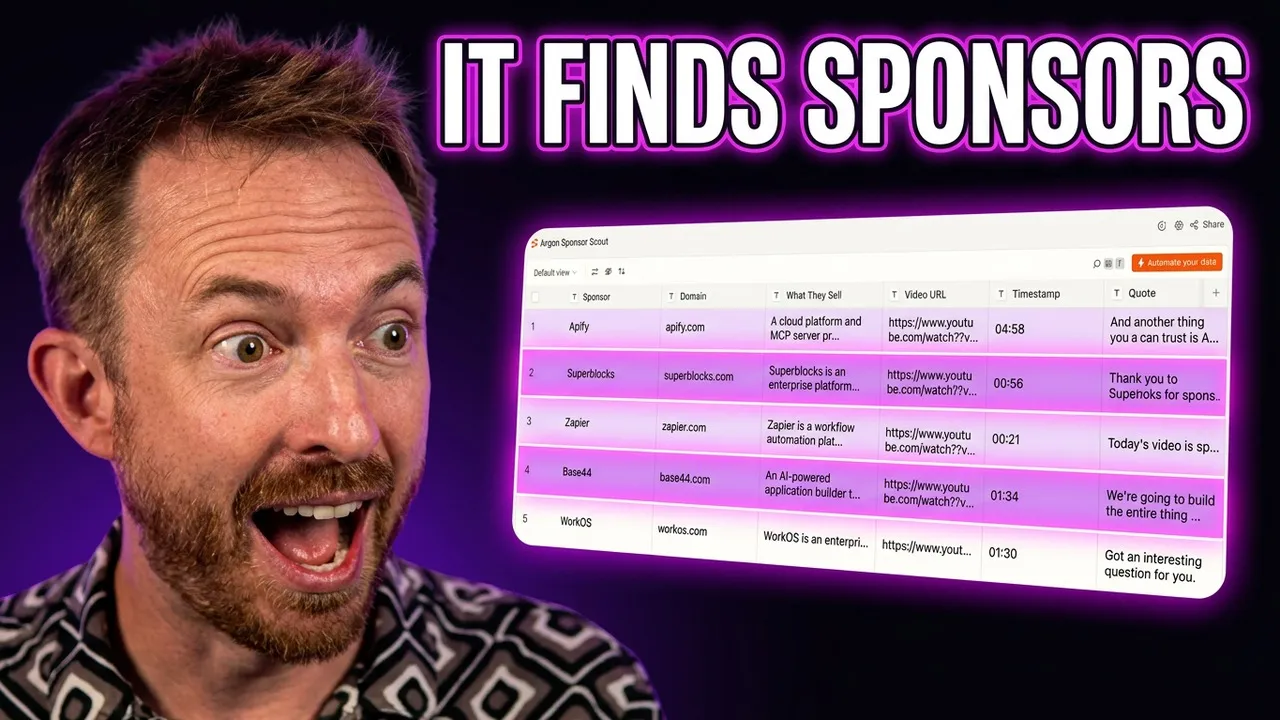
Superblocks, head of marketing. Base44, the app builder Wix bought, and it went straight to Wix’s head of influencer marketing. And the one that made me laugh: one of the videos was sponsored by Zapier, and it found my own contact there. Hello.
Every row has the quote from the video, the timestamp, the LinkedIn profile, an email Hunter.io has checked, and a pitch in my voice. It never mentions which creator it saw them on and it never offers a call. Short and to the point, the way I would write outreach.
To run it on your own niche:
Run the "Argon Sponsor Scout" draft on these videos from creators in my niche, then show me what landed in the table: [FIVE YOUTUBE URLS]Two limits, and a human in the loop
Two things it cannot do yet.
- If a sponsor is only in the description and never said out loud, watching the video can miss it. Easy fix: feed the description in too.
- I check every contact before anything gets sent. Nothing goes out automatically. Argon finds them and I decide.
I am the filter, and that matters. If you have watched Creator Magic for a while you will know I do not feature sponsors willy-nilly. I only work with people and tools I believe in and want to use.
What it costs per video
Argon reads video at about 100 tokens a second, so a 6 minute video is about $0.07 on your API key. Hunter spends one credit per new email it finds.
That matters to me because I run a version of this every day for my own sponsors.
What you need to build it yourself
You do not need any of my setup. You need Zapier, a Gemini API key and one well written prompt.
- A Zapier account. Build it yourself in Zapier. Zapier MCP is included on every plan.
- A Google AI Studio API key with Gemini 4 Argon on it, connected in Zapier as “Google AI Studio (Gemini)”.
- A Hunter.io account. The free tier works.
- Gemini CLI with your Zapier MCP server connected.
Everything above, plus the setup notes, is on the exact prompt page. Turn on “Agentically managed” so the workflow repairs itself when a connection expires.
Other uses
You do not have to use my use case. You could point a version of this at sponsored posts on X. Start with AI to figure out the job, then let Zapier run it every day.
I’ve since pointed Gemini 4 Argon at hardware too. It wrote the firmware for a board that wasn’t even out yet: ESP-Mosaico, Gemini 4 Argon wrote my ESP32-S31 firmware.
What niche would you point it at first? Come and tell me in the community.